
Python – Tuples
Python – Tuples: In Python, a Tuple is a sort of data container that allows you to store numerous pieces of information in one variable. It can include components of several data kinds. A tuple’s elements are ordered and may be retrieved by using the index number. Tuples, unlike lists, are immutable, which means that the elements of a tuple cannot be changed.
Create Tuple
Tuples are made by separating their elements with a comma and surrounding them in round brackets ( ). It may also be produced with the help of the tuple() method.
#Tuple with multiple datatypes
Info = ('John', 25, 'London')
print(Info)

#Creating tuple using constructor
colors = tuple(('Red', 'Blue', 'Green'))
print(colors)
The output of the above code will be:
('John', 25, 'London')
('Red', 'Blue', 'Green')
Access element of a Tuple
The index number of a tuple element can be used to access it. In Python – Tuples , the index number for a tuple starts with 0 in the forward direction and -1 in the reverse way. The indexing idea of a tuple is depicted in the diagram below.
Tuple Indexing:
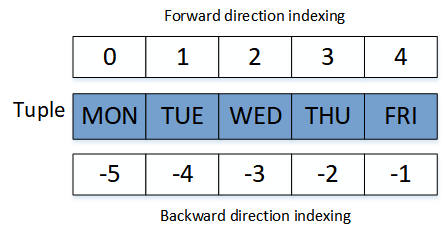
The following example shows how to use a tuple’s index number to retrieve its elements.
weekday = ('MON', 'TUE', 'WED', 'THU', 'FRI')
#forward indexing
print(weekday[1])

#backward indexing
print(weekday[-1])
The output of the above code will be:
TUE
FRI
Access range of elements of a Tuple
A tuple’s range of members can be chosen using a statement like [startIndex: endIndex], where end index is not included. If neither start index nor end index are specified, the first and last index numbers in the tuple are used.
weekday = ('MON', 'TUE', 'WED', 'THU', 'FRI')
print(weekday[1:3])
print(weekday[-5:-1],"\n")

print(weekday[1:])
print(weekday[:-3],"\n")

print(weekday[:])
The output of the above code will be:
('TUE', 'WED')
('MON', 'TUE', 'WED', 'THU')

('TUE', 'WED', 'THU', 'FRI')
('MON', 'TUE')

('MON', 'TUE', 'WED', 'THU', 'FRI')
Modify value of an Element
Tuple’s elements are unchangeable and immutable. There is, however, a technique to get around this. To begin, convert the tuple to a list using the list() function, make the necessary modifications, and then convert it back to a tuple using the tuple() function.
Info = ('John', 25, 'London')
#tuple converted into list
Info = list(Info)
#Making required changes
Info[0] = 'Marry'
#list converted back to tuple
Info = tuple(Info)
print(Info)
The above code will give the following output:
('Marry', 25, 'London')
Add / Delete elements of a Tuple
Tuple’s elements are unchangeable and immutable. As a result, after the tuple has been created, it is not feasible to delete or edit elements.
month = ('JAN', 'FEB', 'MAR')
# returns an error
month[3] = 'APR'
print(month)
The output of the above code will be:
TypeError: 'tuple' object does not support item assignment
Similarly, deleting an element of a tuple is not feasible.
month = ('JAN', 'FEB', 'MAR')
# returns an error
del month[2]
print(month)
The output of the above code will be:
Traceback (most recent call last):
  File "Main.py", line 3, in <module>
    del month[2]
TypeError: 'tuple' object doesn't support item deletion
The tuple, on the other hand, maybe erased by itself using the del keyword.
month = ('JAN', 'FEB', 'MAR')
# delete tuple completely
del month
print(month)
The output of the above code will be:
Traceback (most recent call last):
  File "Main.py", line 4, in <module>
    print(month)
NameError: name 'month' is not defined
Tuple Length
To determine the total number of entries in a list, tuple, set, or dictionary, use the len() function.
number = (10, 50, 50, 100, 1000, 1000)
print(len(number))
The output of the above code will be:
6
Loop over Tuple
For loop over Tuple:
Each element of a tuple may be accessed using a for loop.
colors = ('Red', 'Blue', 'Green')
for x in colors:
    print(x)
The output of the above code will be:
Red
Blue
Green
While loop over Tuple
Each element of a tuple may be retrieved using the while loop and the len() method.
colors = ('Red', 'Blue', 'Green')
i = 0
while i < len(colors):
    print(colors[i])
    i = i + 1
The above code will give the following output:
Red
Blue
Green
Check an element in the Tuple
colors = ('Red', 'Blue', 'Green')
if 'white' in colors:
  print('Yes, white is an element of colors.')
else:
  print('No, white is not an element of colors.')
The above code will give the following output:
No, white is not an element of colors.
Join Tuples
To unite two tuples into a new tuple, use the + operator.
colors = ('Red', 'Blue', 'Green')
numbers = (10, 20)
mytuple = colors + numbers
print(mytuple)
The output of the above code will be:
('Red', 'Blue', 'Green', 10, 20)
Single Element Tuple
To make a single element tuple, add a comma after the element.
#this is tuple
color = ('Red',)
print(type(color))

#this is string
color = ('Red')
print(type(color))
The output of the above code will be:
<class 'tuple'>
<class 'str'>