
Java – For Loop
Java for Loop
Each iteration of the for loop performs a sequence of statements. For loops are chosen over while loops where the number of iterations is known.
Syntax
for(initialization(s); condition(s); counter_update(s);){
  statements;
}
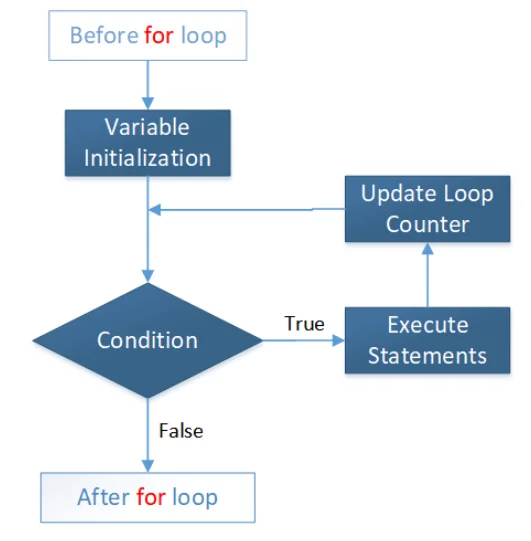
- Initialization(s): Variable(s) are initialised and performed just once in this section.
- Condition(s): In this section, condition(s) are defined and performed at the start of the loop every time.
- Counter Update(s): Loop counters are updated in this section and are executed at the end of the loop every time.
Flow Diagram:
Example:
public class MyClass {
  public static void main(String[] args) {
    for (int i = 1; i <= 5; i++)
      System.out.println(i);
  }
}
The output of the above code will be:
1
2
3
4
5
Example:
A single for loop can conduct several initializations, condition tests, and loop counter updates. Two variables, i and j, are initialised, numerous conditions are verified, and multiple variables are modified in a single for loop in the example below.
public class MyClass {
  public static void main(String[] args) {
    for (int i = 1, j = 100;   i <= 5 || j <= 800;   i++, j = j + 100)
      System.out.println("i="+i+", j="+j);
  }
}
The output of the above code will be:
i=1, j=100
i=2, j=200
i=3, j=300
i=4, j=400
i=5, j=500
i=6, j=600
i=7, j=700
i=8, j=800
Java for-each Loop
To traverse an array or a collection in Java, use the for-each loop. The current element is assigned to a user-defined variable in each iteration of the loop, and the array/collection pointer is shifted to the next element, which is handled in the following iteration. Please keep in mind that it operates on an element-by-element basis (not an index basis).
Syntax
for(variable: array/collection){
  statements;
}
The for-each loop is used in the example below on an array named Arr, which is then used to print each element of the array in each iteration.
public class MyClass {
  public static void main(String[] args) {
    int Arr[]={10, 20, 30, 40 ,50};

    System.out.println("The Arr contains:");
    for(int i: Arr)
       System.out.println(i);
  }
}
The output of the above code will be:
The Arr contains:
10
20
30
40
50