Create Snake game using python turtle
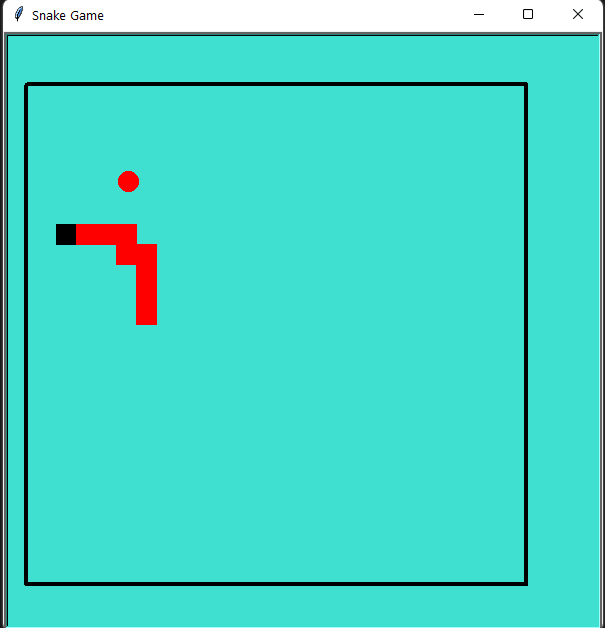
In this tutorial, we are going to show and explain How to Create Snake game using python turtle. We have added the video tutorial and the source code of the program.
So let us begin with the Create Snake game using python turtle.
Video Tutorial: Create Snake game using python turtle
Source Code:
#create snake game in python
import turtle
import random
import time

#creating turtle screen
screen = turtle.Screen()
screen.title('Snake Game')
screen.setup(600,600, startx=0,starty=100)
screen.tracer(0)
turtle.bgcolor('turquoise')

##creating a border for our game

turtle.speed(5)
turtle.pensize(4)
turtle.penup()
turtle.goto(-280,250)
turtle.pendown()
turtle.color('black')
turtle.forward(500)
turtle.right(90)
turtle.forward(500)
turtle.right(90)
turtle.forward(500)
turtle.right(90)
turtle.forward(500)
turtle.penup()
turtle.hideturtle()

#score
score = 0
delay = 0.1

#snake
snake = turtle.Turtle()
snake.speed(0)
snake.shape('square')
snake.color("black")
snake.penup()
snake.goto(0,0)
snake.direction = 'stop'

#food
fruit = turtle.Turtle()
fruit.speed(0)
fruit.shape('circle')
fruit.color('red')
fruit.penup()
fruit.goto(30,30)

old_fruit=[]

#scoring
scoring = turtle.Turtle()
scoring.speed(0)
scoring.color("black")
scoring.penup()
scoring.hideturtle()
scoring.goto(0,300)
scoring.write("Score :",align="center",font=("Courier",24,"bold"))

#######define how to move
def snake_go_up():
    if snake.direction != "down":
        snake.direction = "up"

def snake_go_down():
    if snake.direction != "up":
        snake.direction = "down"

def snake_go_left():
    if snake.direction != "right":
        snake.direction = "left"

def snake_go_right():
    if snake.direction != "left":
        snake.direction = "right"

def snake_move():
    if snake.direction == "up":
        y = snake.ycor()
        snake.sety(y + 20)

    if snake.direction == "down":
        y = snake.ycor()
        snake.sety(y - 20)

    if snake.direction == "left":
        x = snake.xcor()
        snake.setx(x - 20)

    if snake.direction == "right":
        x = snake.xcor()
        snake.setx(x + 20)

# Keyboard bindings
screen.listen()
screen.onkeypress(snake_go_up, "Up")
screen.onkeypress(snake_go_down, "Down")
screen.onkeypress(snake_go_left, "Left")
screen.onkeypress(snake_go_right, "Right")

#main loop

while True:
        screen.update()
            #snake and fruit coliisions
        if snake.distance(fruit)< 20:
                x = random.randint(-290,270)
                y = random.randint(-240,240)
                fruit.goto(x,y)
                scoring.clear()
                score+=1
                scoring.write("Score:{}".format(score),align="center",font=("Courier",24,"bold"))
                delay-=0.001

                ## creating new_ball
                new_fruit = turtle.Turtle()
                new_fruit.speed(0)
                new_fruit.shape('square')
                new_fruit.color('red')
                new_fruit.penup()
                old_fruit.append(new_fruit)

        #adding ball to snake

        for index in range(len(old_fruit)-1,0,-1):
                a = old_fruit[index-1].xcor()
                b = old_fruit[index-1].ycor()

                old_fruit[index].goto(a,b)

        if len(old_fruit)>0:
                a= snake.xcor()
                b = snake.ycor()
                old_fruit[0].goto(a,b)
        snake_move()

        ##snake and border collision
        if snake.xcor()>280 or snake.xcor()< -300 or snake.ycor()>240 or snake.ycor()<-240:
                time.sleep(1)
                screen.clear()
                screen.bgcolor('turquoise')
                scoring.goto(0,0)
                scoring.write("   GAME OVER \n Your Score is {}".format(score),align="center",font=("Courier",30,"bold"))

        ## snake collision
        for food in old_fruit:
                if food.distance(snake) < 20:
                        time.sleep(1)
                        screen.clear()
                        screen.bgcolor('turquoise')
                        scoring.goto(0,0)
                        scoring.write("    GAME OVER \n Your Score is {}".format(score),align="center",font=("Courier",30,"bold"))

        time.sleep(delay)

turtle.Terminator()
Output: